This product is a Timekettle FM Translation Guide series product, model: FM100.1, consisting of three components:
a Timekettle Fluentalk Translator, a Wireless Bluetooth FM Transmitter,
and Broadcast Earphones. The three devices are interconnected via Bluetooth and FM transmission to enable
real-time translation and wireless guided tour functionality.
The guide holds the translator and speaks into it. The translator performs real-time translation and transmits the audio
via Bluetooth to the transmitter. The transmitter then broadcasts the signal wirelessly to all earphones,
allowing listeners to receive the translated audio content through their earphones.
This system is suitable for various cross-language communication scenarios including tourism, conferences,
training sessions, VIP reception, and museum/exhibition guided tours.
II. Packing List
Device Name
Model
Quantity
Function Description
Translator
FM-fluentalk
1 unit
Voice recognition & real-time translation, connects to transmitter via Bluetooth
Transmitter
FM-transmitter
1 unit
Receives Bluetooth audio and broadcasts wirelessly to earphones
Earphone
FM-Earbuds
10/20/30/50 units
Worn by listeners, ear-hook style for receiving translated audio
Charging Dock
10/20/30
1 piece
Earphone charging slots
Storage Case
Timekettle
1 unit
Built-in foam padding
III. Product Introduction
Device Connection Steps
For first-time use, the devices come pre-paired. If you need to adjust the device connections, follow these steps:
① Turn on all three devices (Translator, Transmitter, Earphone)
→ ② Pair the Translator with the Transmitter via Bluetooth — open the Translator's Bluetooth settings, search for "D313", and connect
→ ③ Pair the Receiver with the Earphone via FM frequency
→ ④ Begin use
After successful pairing, the devices will automatically reconnect next time (the transmitter must be turned on first). If the earphone channel has not changed, re-pairing is not required.
The effective Bluetooth range (between translator and transmitter) is approximately 10 meters. It is recommended that the guide carry both the translator and transmitter on their person.
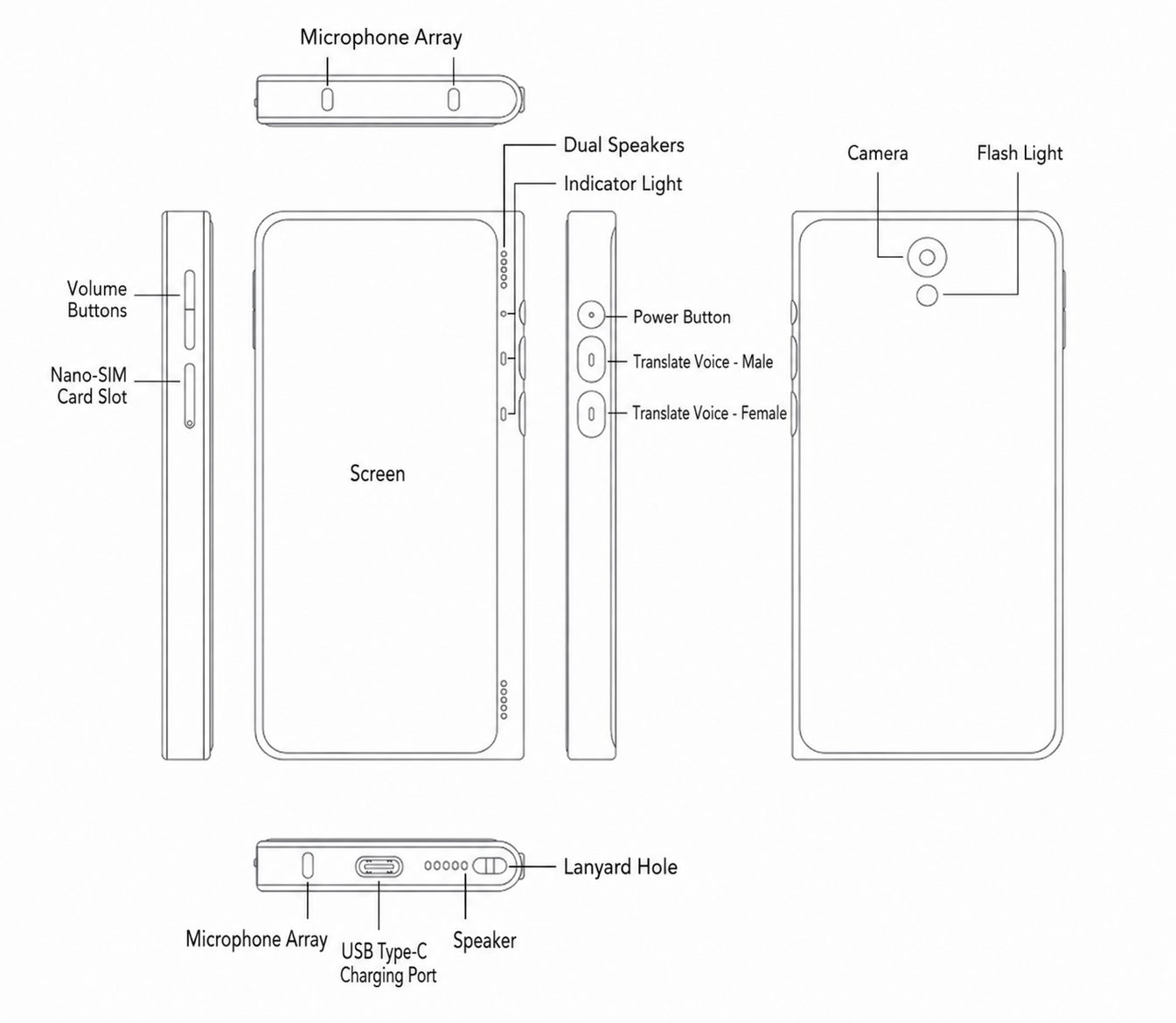
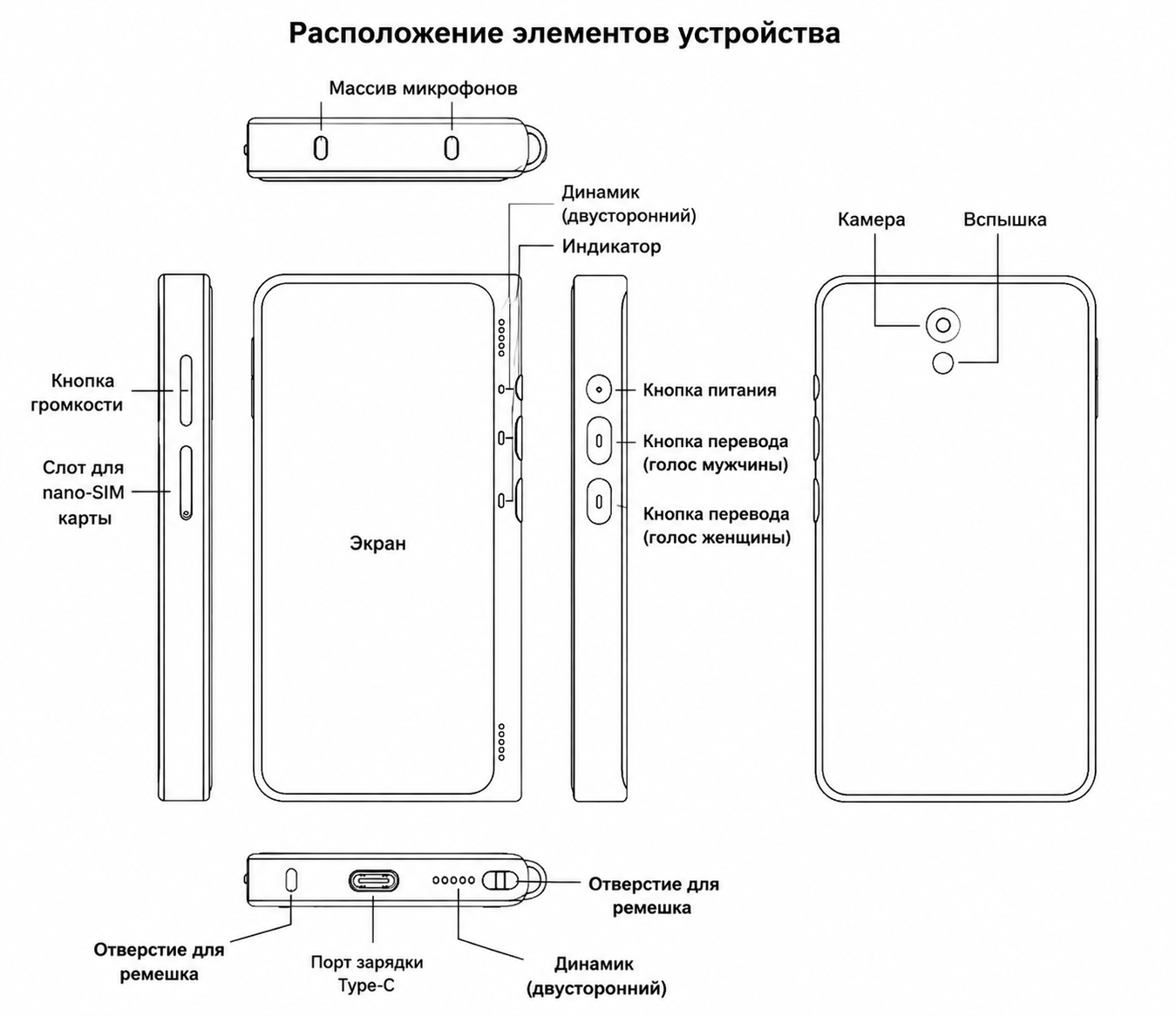
3.1 Timekettle Fluentalk Translator
Translator Packing List
Item
Quantity
Translator
1 unit
SIM Eject Pin
1 piece
Lanyard
1 piece
Basic Operations
Power On / Off / Restart
Long press the power button for 3 seconds or more to turn on the translator.
Long press the power button again to select Power Off / Restart.
For first-time use, please follow the on-screen instructions to activate the device.
Built-in eSIM Card
You can enjoy two years of free data for online translation.
Installing a nano-SIM Card
Insert the SIM eject pin into the small hole on the SIM card tray and push inward to eject the tray.
Place the nano-SIM card into the tray frame, then insert the tray back into the translator.
The nano-SIM card must be purchased separately.
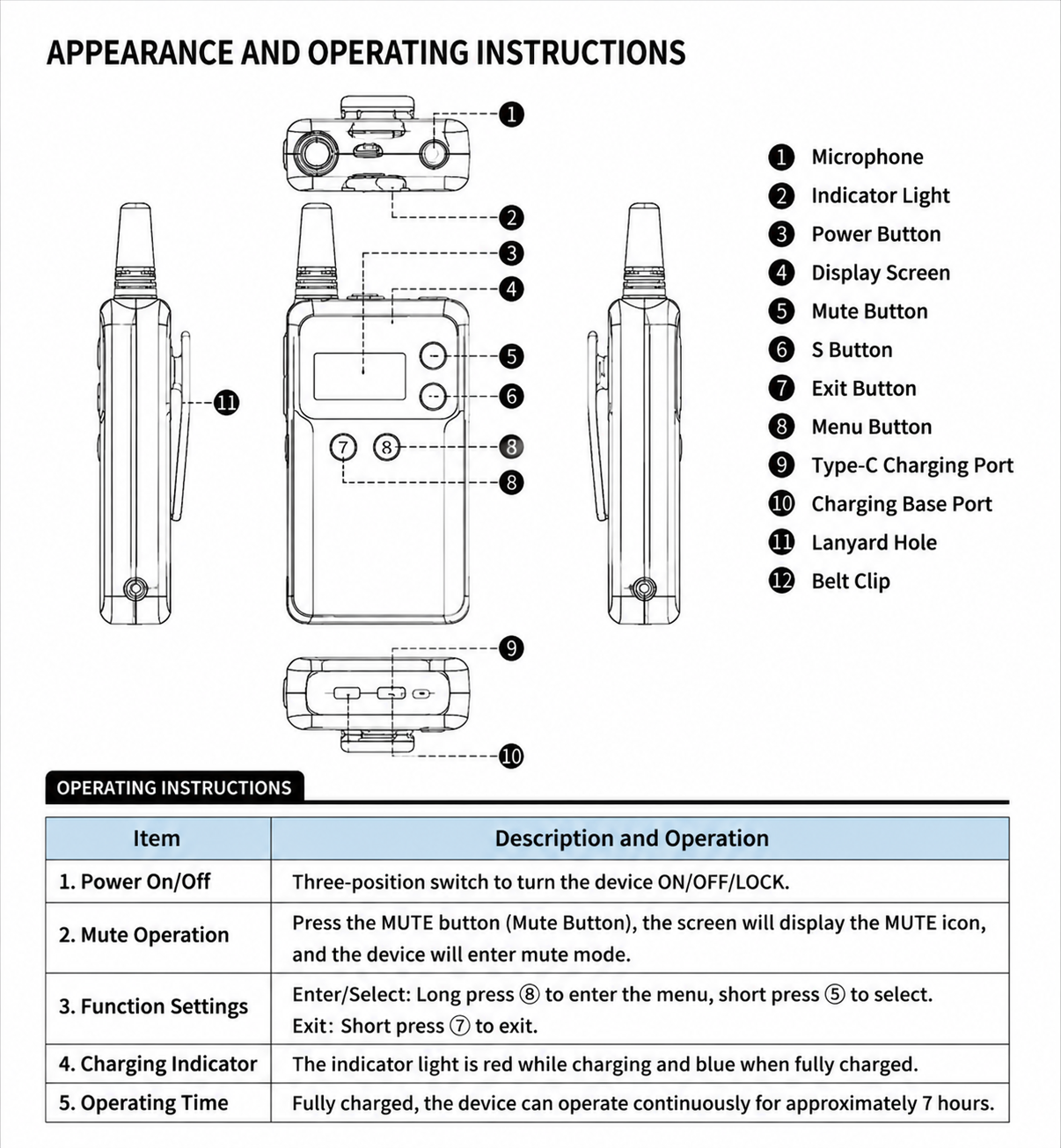
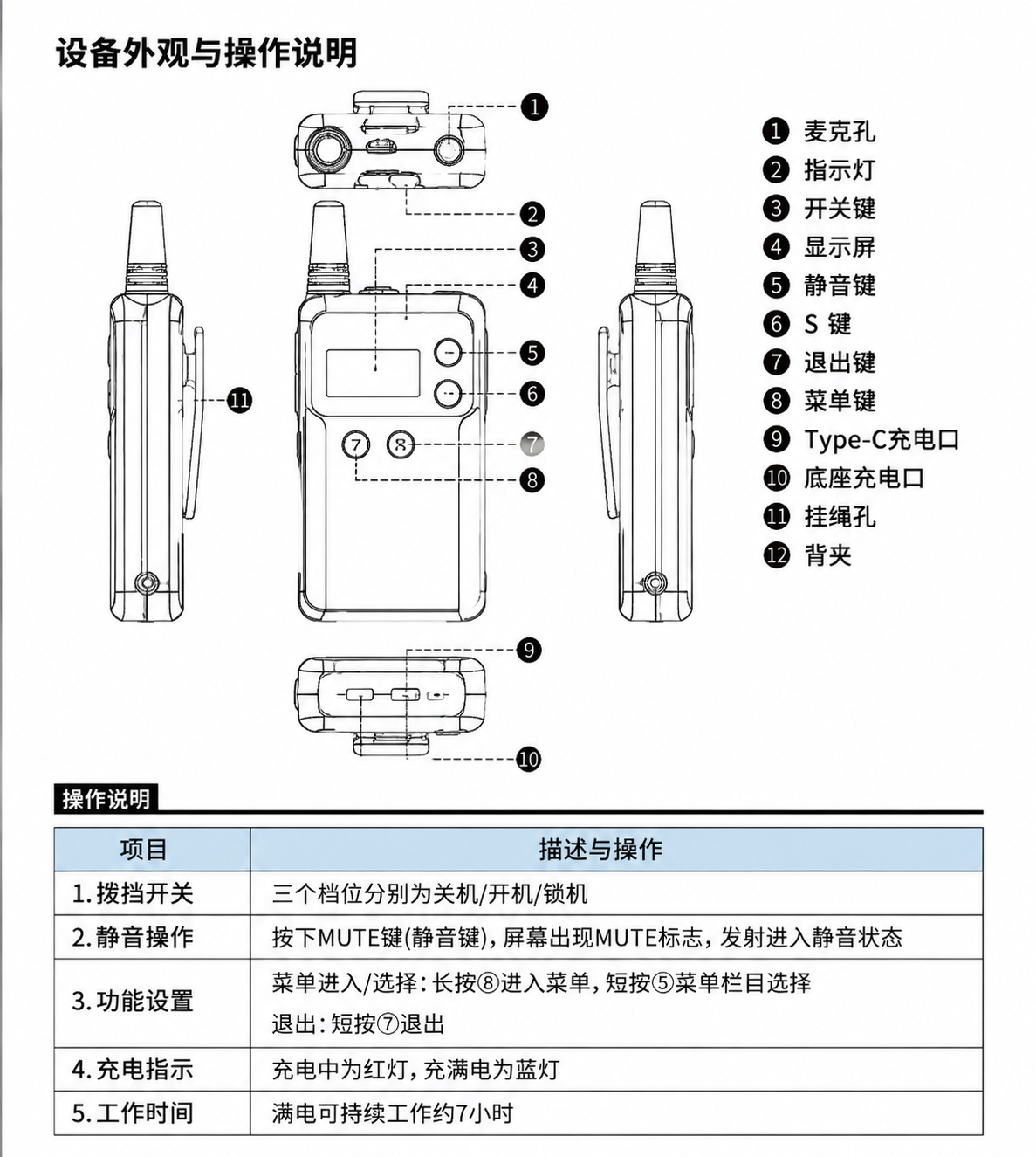
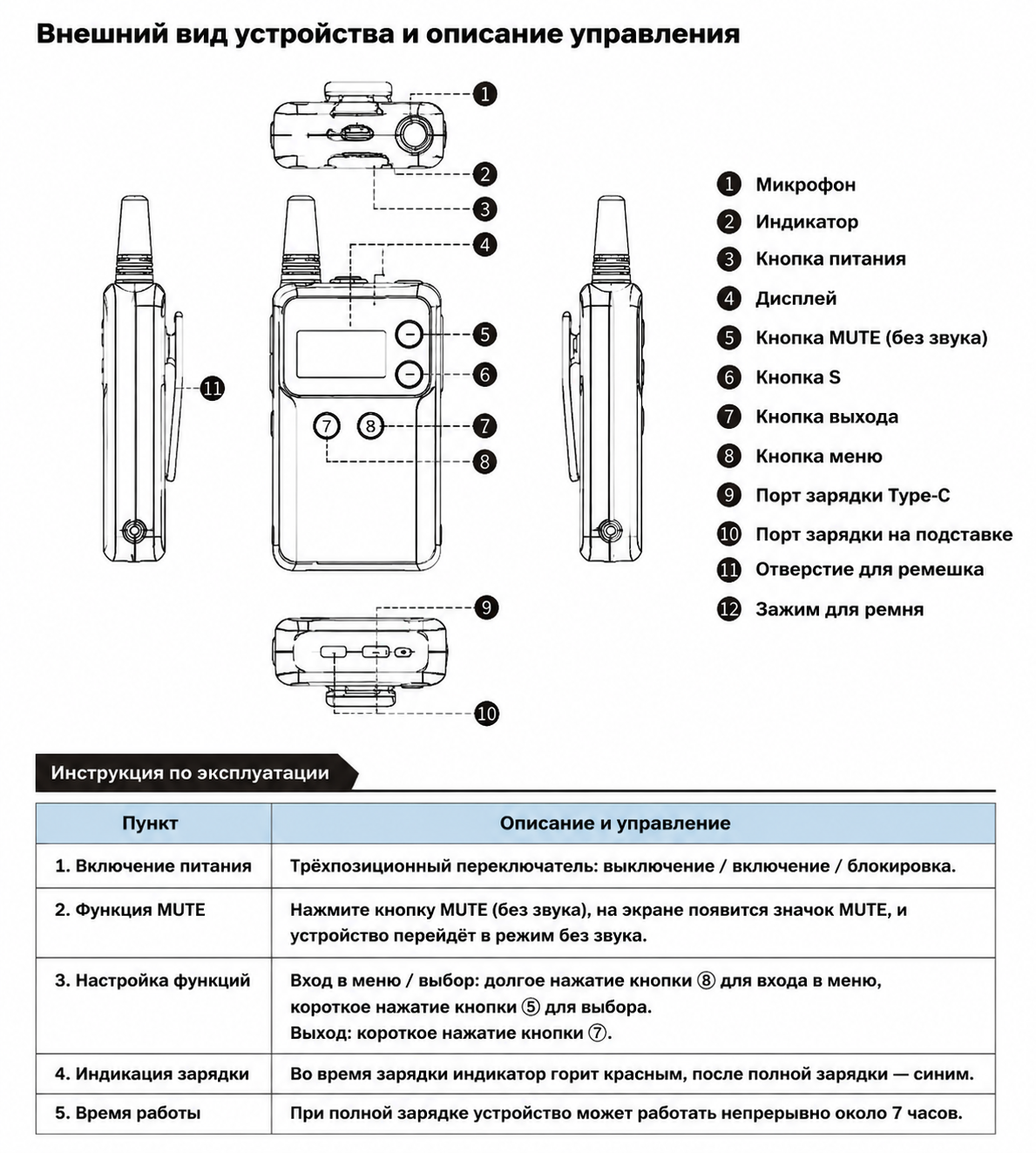
3.2 Wireless Transmitter
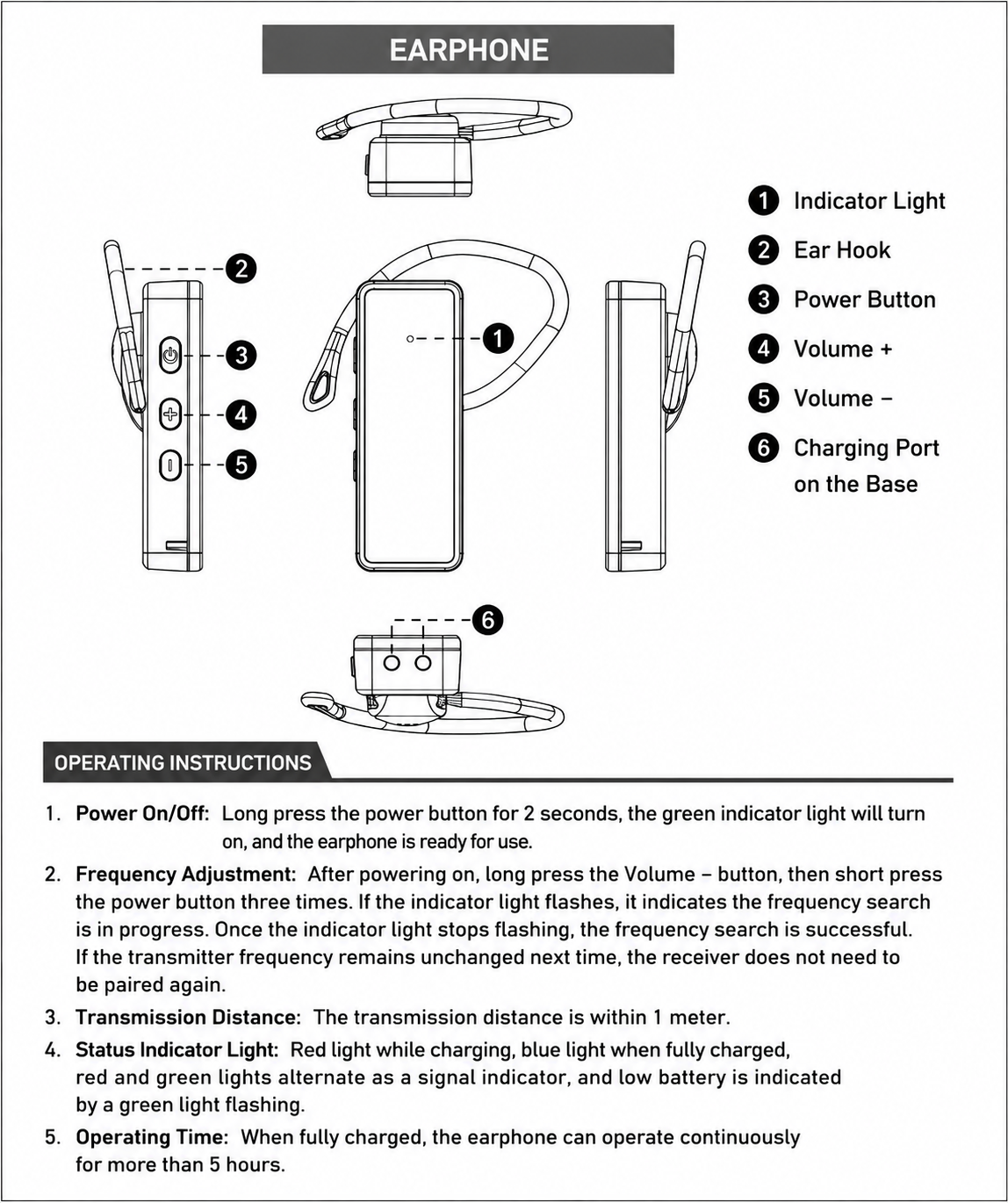
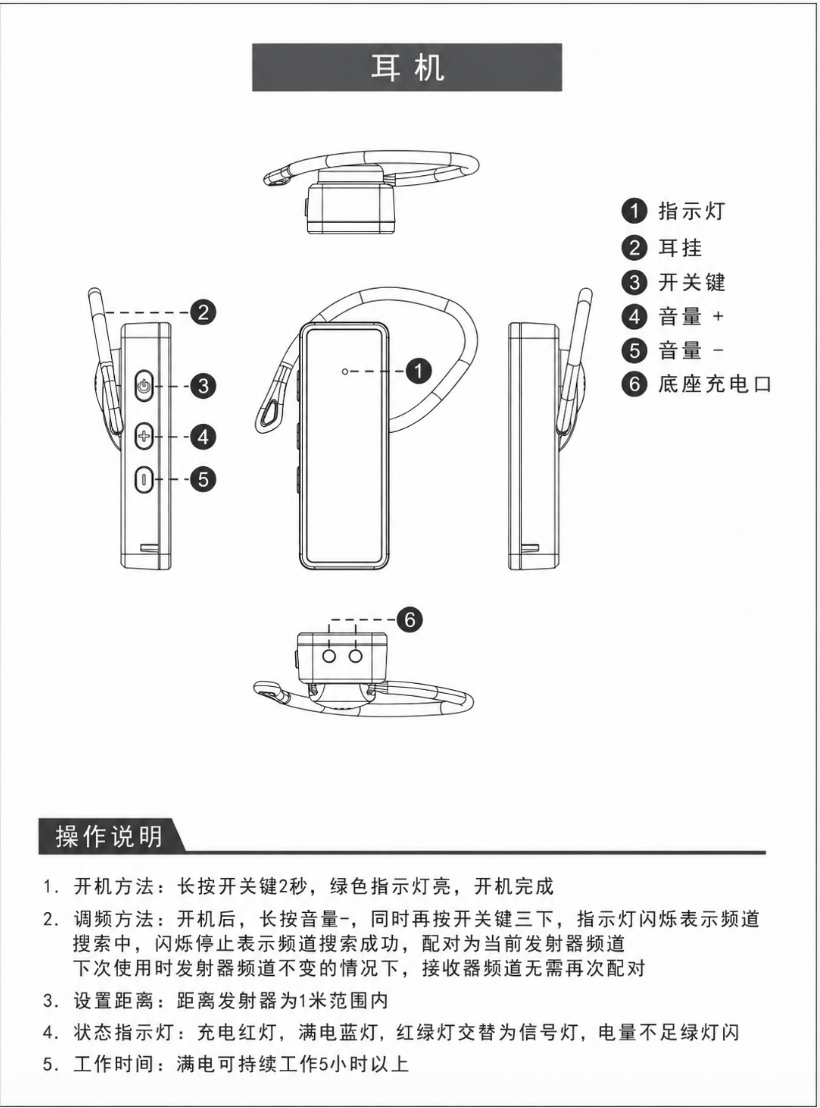
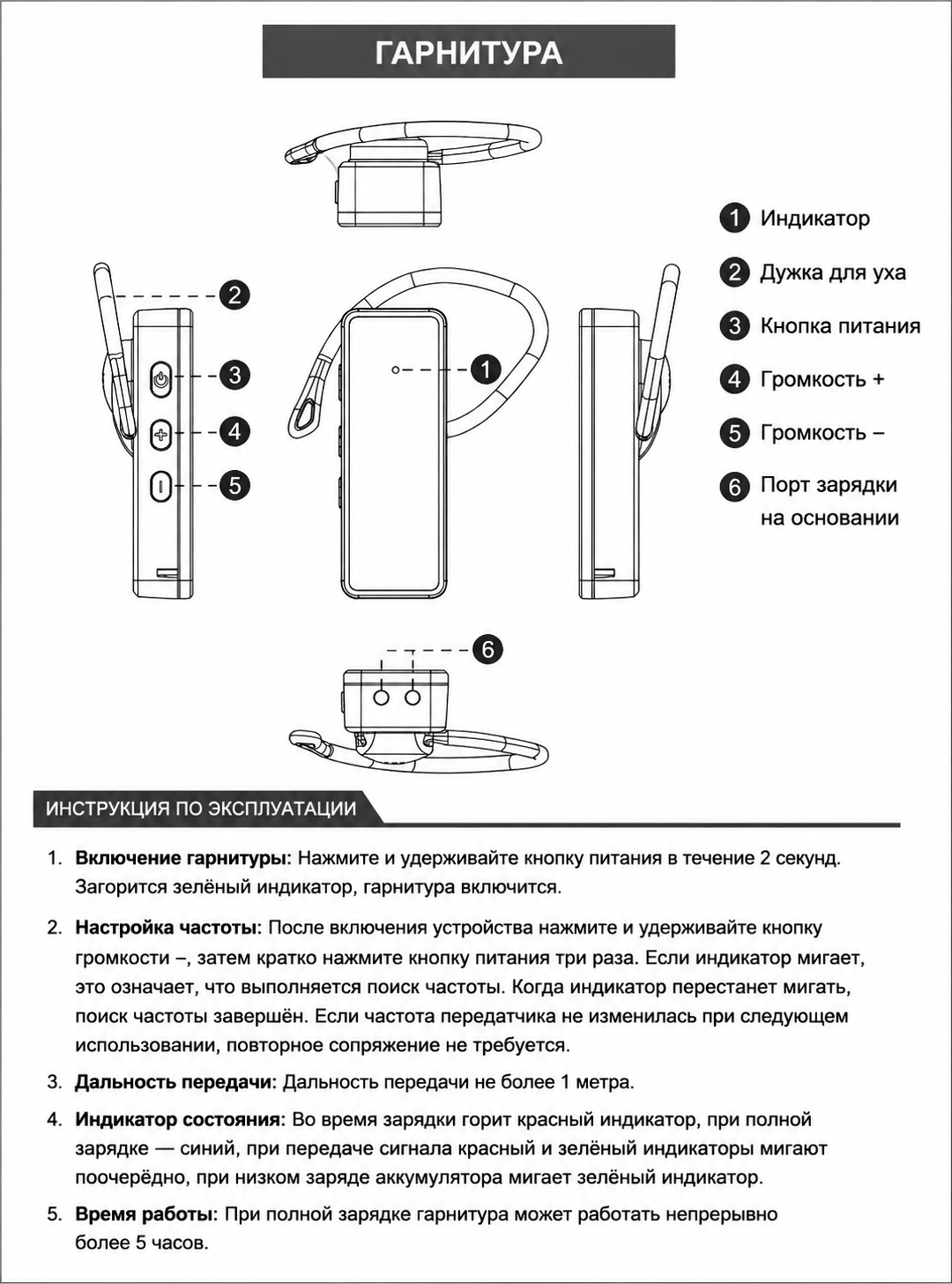
3.3 Broadcast Earphone
IV. Product Specifications
Type
Parameter
Rated Output Power
200W
Input Voltage
200-240V, 50-60Hz
Output Voltage
DC5V-40A
Accuracy
±5%
Dimensions
47 x 16.5 x 35 cm (50-unit earphone charging case)
Charging Slots
10/20/30/50 slots (based on quantity of earphones purchased)
Transmitter-to-Earphone Range
1–100 meters
Translator-to-Transmitter Bluetooth Range
10 meters; recommended to carry both on person
Continuous Working Time
2.5 hours (translation with screen always on); 3.5 hours (translation with screen off).
V. Frequently Asked Questions
Symptom
Possible Cause
Solution
No Sound
Translator playback switch is off
Turn on the speaker icon on the translator screen
Translator volume too low
Adjust the translator volume buttons
Transmitter is not turned on
Turn on the transmitter
Receiver is not turned on
Turn on the receiver
Channel mismatch
Re-adjust channels to ensure they match
Transmitter is muted
Press the MUTE button to unmute
Bluetooth not connected
Check Bluetooth pairing between translator and transmitter
Switch to WiFi or use a SIM card with stable signal
SIM Card No Data
Card slot installation or network settings issue
Check SIM card installation and mobile network settings
VI. Precautions
The receiver and transmitter channels must match for proper operation. There is no limit on the number of receivers.
Do not use more than two transmitters on the same channel at the same time and location.
Do not use or store the device in dusty, humid, high-temperature, or strong magnetic field environments.
This device has been calibrated with precision instruments. Do not disassemble it on your own.
If not used for extended periods, charge the device once every 6 months.
After the translator's built-in mobile data expires (2 years), you will need to connect to the internet independently (WiFi or SIM mobile data).
VII. Safety Information
Please read the following safety information before using this product:
Do not charge using non-officially recommended methods to avoid fire, explosion, or other hazards.
Avoid dropping, burning, crushing, or submerging the product in liquid.
Do not expose the product to high temperatures or place it near heat-generating devices such as ovens or microwaves.
Use within 0–35°C; store within -20–45°C.
We are not responsible for issues caused by the use of non-officially approved accessories.
Power adapters should be CCC-certified products.
Improper battery replacement may cause explosion risk. Only replace with the same type of battery.
Do not expose the battery to sunlight, fire, or overheating environments.
VIII. Company Information
Company Website
[www.timekettle.co](https://www.timekettle.co)
Customer Service Email
support@timekettle.co
Manufacturer
Shenzhen Timekettle Technologies Co., Ltd.
Address
Room 801, West Tower, Lepu Building, Nanshan District, Shenzhen
Copyright
Shenzhen Timekettle Technologies Co., Ltd.
IX. Warranty Card
X. Warranty Terms
Please retain your proof of purchase and warranty card as warranty credentials.
From the date of purchase, the product is covered by a 1-year warranty and accessories by a 6-month warranty for quality issues under normal use. Free repair is available with proof of purchase and warranty card. Subject to national Three Guarantees policy.
Not covered under warranty: Normal wear and tear; damage caused by not following the user manual; damage caused by force majeure.
For faults caused by human factors, expired warranty, or force majeure, a reasonable repair fee will be charged.
*The above information is subject to change. Please refer to the official website for the latest updates.
Данный продукт — устройство серии Timekettle FM для перевода экскурсий, модель: FM100.1. Он состоит из трёх компонентов:
переводчика Timekettle Fluentalk, беспроводного Bluetooth FM-передатчика
и наушников для трансляции. Три устройства соединяются между собой через Bluetooth и FM-передачу,
обеспечивая перевод в реальном времени и функцию беспроводного экскурсионного сопровождения.
Экскурсовод держит переводчик и говорит в него. Переводчик выполняет перевод в реальном времени и передаёт звук
через Bluetooth на передатчик. Затем передатчик транслирует сигнал по беспроводной связи на все наушники,
и слушатели получают переведённый звук через свои наушники.
Система подходит для различных сценариев межъязыкового общения, включая туризм, конференции,
обучение и тренинги, приём VIP-гостей, а также экскурсии в музеях и на выставках.
II. Комплектация
Наименование устройства
Модель
Количество
Описание функции
Переводчик
FM-fluentalk
1 шт.
Распознавание речи и перевод в реальном времени, подключение к передатчику через Bluetooth
Передатчик
FM-transmitter
1 шт.
Принимает звук по Bluetooth и транслирует его по беспроводной связи на наушники
Наушники
FM-Earbuds
10/20/30/50 шт.
Носятся слушателями, заушного типа, для приёма переведённой речи
Зарядная станция
10/20/30
1 шт.
Слоты для зарядки наушников
Кейс для хранения
Timekettle
1 шт.
Со встроенным поролоновым вкладышем
III. Описание продукта
Шаги подключения устройств
При первом включении устройства уже сопряжены. Если требуется изменить подключение устройств, выполните следующие шаги:
① Включите все три устройства (переводчик, передатчик, наушники)
→ ② Сопрягите переводчик с передатчиком по Bluetooth — откройте настройки Bluetooth на переводчике, найдите «D313» и подключитесь
→ ③ Сопрягите приёмник с наушниками по FM-частоте
→ ④ Начните использование
После успешного сопряжения устройства автоматически переподключатся при следующем включении (передатчик нужно включить первым). Если канал наушников не менялся, повторное сопряжение не требуется.
Эффективная дальность Bluetooth (между переводчиком и передатчиком) составляет примерно 10 метров. Рекомендуется, чтобы экскурсовод носил переводчик и передатчик при себе.
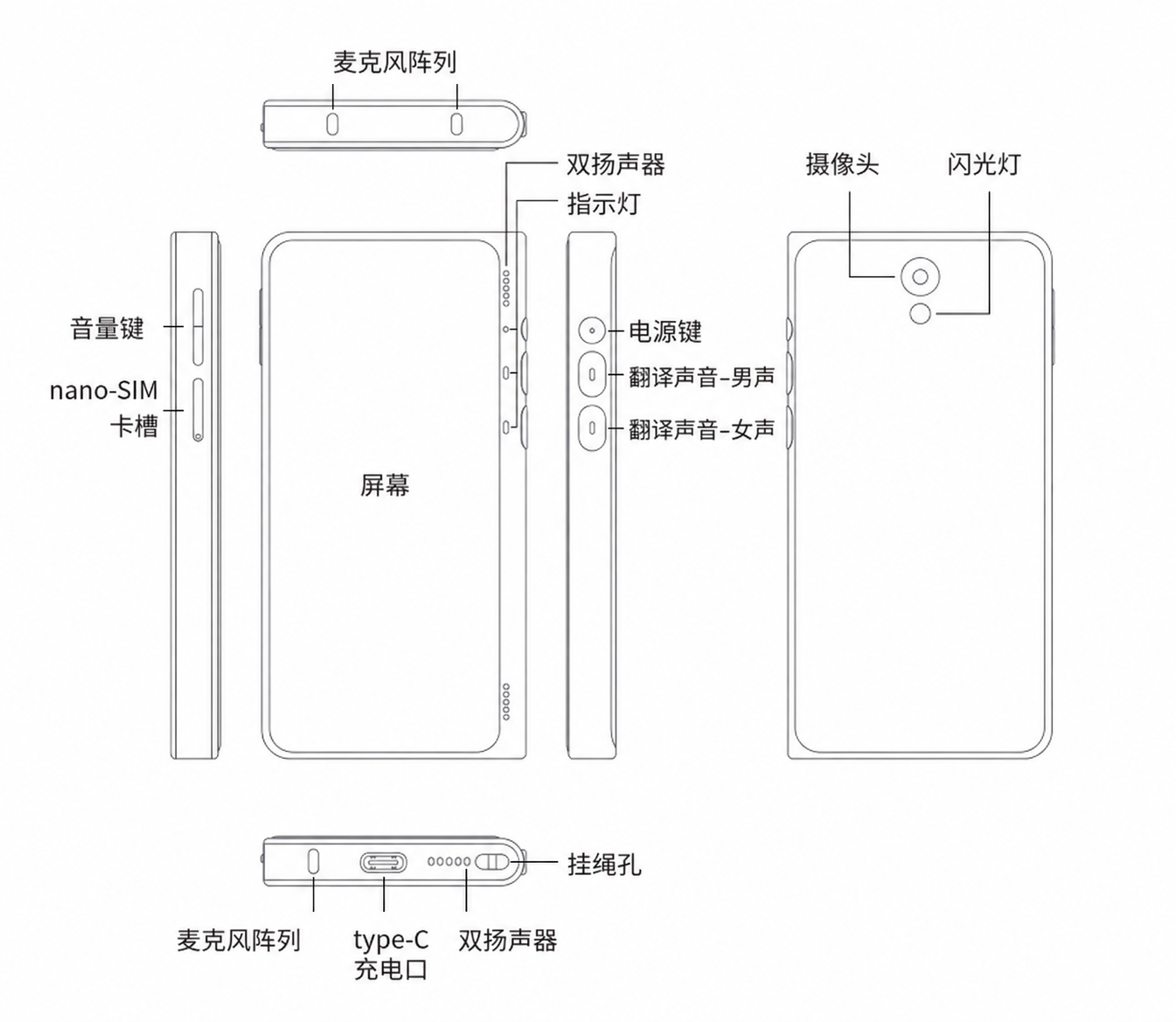
3.1 Переводчик Timekettle Fluentalk
Комплектация переводчика
Предмет
Количество
Переводчик
1 шт.
Игла для извлечения SIM-карты
1 шт.
Ремешок
1 шт.
Основные операции
Включение / выключение / перезагрузка
Нажмите и удерживайте кнопку питания 3 секунды или дольше, чтобы включить переводчик.
Снова нажмите и удерживайте кнопку питания, чтобы выбрать «Выключение / Перезагрузка».
При первом использовании следуйте инструкциям на экране для активации устройства.
Встроенная eSIM-карта
Вы можете пользоваться двумя годами бесплатного трафика для онлайн-перевода.
Установка nano-SIM-карты
Вставьте иглу для извлечения SIM-карты в небольшое отверстие лотка SIM-карты и нажмите внутрь, чтобы извлечь лоток.
Поместите nano-SIM-карту в рамку лотка, затем вставьте лоток обратно в переводчик.
Nano-SIM-карта приобретается отдельно.
3.2 Беспроводной передатчик
3.3 Наушники для трансляции
IV. Технические характеристики
Тип
Параметр
Номинальная выходная мощность
200 Вт
Входное напряжение
200–240 В, 50–60 Гц
Выходное напряжение
DC 5В–40А
Точность
±5%
Размеры
47 x 16,5 x 35 см (зарядный кейс на 50 наушников)
Число зарядных слотов
10/20/30/50 слотов (в зависимости от количества приобретённых наушников)
Дальность связи между передатчиком и наушниками
1–100 метров
Дальность Bluetooth-соединения между переводчиком и передатчиком
10 метров; рекомендуется носить оба устройства при себе
Время непрерывной работы
2,5 часа (перевод с постоянно включённым экраном); 3,5 часа (перевод с выключенным экраном).
V. Часто задаваемые вопросы
Признак
Возможная причина
Решение
Нет звука
Переключатель воспроизведения на переводчике выключен
Включите значок динамика на экране переводчика
Слишком низкая громкость переводчика
Отрегулируйте кнопки громкости переводчика
Передатчик не включён
Включите передатчик
Приёмник не включён
Включите приёмник
Несовпадение каналов
Заново настройте каналы, чтобы они совпадали
Передатчик в режиме «без звука»
Нажмите кнопку MUTE, чтобы отключить режим «без звука»
Bluetooth не подключён
Проверьте сопряжение Bluetooth между переводчиком и передатчиком
Слышен посторонний звук
Канал слишком близок к каналу другого пользователя
Переключитесь на другой канал
Низкая точность перевода
Чрезмерный окружающий шум
Говорите ближе к микрофону переводчика
Слабый сигнал сети
Подключитесь к Wi-Fi или используйте местную SIM-карту с трафиком
Зависание переводчика
Память заполнена
Очистите файлы истории или перезагрузите устройство
Быстрый разряд батареи
Плохое сетевое окружение вызывает частый поиск сети
Переключитесь на Wi-Fi или используйте SIM-карту со стабильным сигналом
Нет данных на SIM-карте
Проблема с установкой карты в слот или настройками сети
Проверьте установку SIM-карты и настройки мобильной сети
VI. Меры предосторожности
Каналы приёмника и передатчика должны совпадать для корректной работы. Количество приёмников не ограничено.
Не используйте более двух передатчиков на одном канале в одно и то же время и в одном месте.
Не используйте и не храните устройство в пыльной, влажной, высокотемпературной среде или в зоне сильного магнитного поля.
Устройство откалибровано на прецизионном оборудовании. Не разбирайте его самостоятельно.
Если устройство не используется длительное время, заряжайте его раз в 6 месяцев.
После истечения встроенного мобильного трафика переводчика (2 года) вам потребуется самостоятельно подключаться к интернету (Wi-Fi или мобильные данные SIM).
VII. Информация о безопасности
Перед использованием продукта прочитайте следующую информацию о безопасности:
Не заряжайте устройство неофициально рекомендованными способами во избежание пожара, взрыва или иных опасностей.
Избегайте падений, сжигания, сдавливания или погружения продукта в жидкость.
Не подвергайте продукт воздействию высоких температур и не размещайте его рядом с нагревательными приборами, такими как духовки или микроволновые печи.
Используйте при температуре 0–35 °C; храните при температуре -20–45 °C.
Мы не несём ответственности за проблемы, вызванные использованием неофициально одобренных аксессуаров.
Блоки питания должны быть сертифицированы по стандарту CCC.
Неправильная замена батареи может привести к риску взрыва. Заменяйте только батареей того же типа.
Не подвергайте батарею воздействию солнечного света, огня или перегрева.
VIII. Информация о компании
Веб-сайт компании
[www.timekettle.co](https://www.timekettle.co)
Эл. почта службы поддержки
support@timekettle.co
Производитель
Shenzhen Timekettle Technologies Co., Ltd.
Адрес
Room 801, West Tower, Lepu Building, Nanshan District, Shenzhen
Авторские права
Shenzhen Timekettle Technologies Co., Ltd.
IX. Гарантийный талон
X. Условия гарантии
Сохраняйте документ, подтверждающий покупку, и гарантийный талон в качестве гарантийных документов.
С даты покупки продукт покрывается гарантией 1 год, а аксессуары — гарантией 6 месяцев на дефекты качества при нормальной эксплуатации. Бесплатный ремонт предоставляется при наличии подтверждения покупки и гарантийного талона. В соответствии с национальной политикой «Трёх гарантий».
Не покрывается гарантией: нормальный износ; повреждения, вызванные несоблюдением руководства пользователя; повреждения вследствие форс-мажорных обстоятельств.
За неисправности, вызванные человеческим фактором, истечением гарантийного срока или форс-мажорными обстоятельствами, взимается разумная плата за ремонт.
*Приведённая выше информация может быть изменена. Актуальные сведения см. на официальном сайте.